If you play Roblox, you've probably seen codes floating around social media, YouTube thumbnails, or Discord servers that promise free items or in-game perks. Maker codes are one type of code that game developers on Roblox can create to give players rewards within their experiences. Knowing how to redeem them means you stop missing out on free stuff that other players are already claiming.
This article walks you through exactly how maker codes work, where to enter them, what to do when they don't work, and how to avoid common frustrations players run into.
What Are Maker Codes in Roblox?
Maker codes are special alphanumeric codes created by Roblox developers (also called "creators" or "makers") for their specific games. Unlike Roblox promo codes that apply platform-wide, maker codes are tied to individual experiences. A developer might release a maker code to celebrate hitting a milestone, promote an update, or reward their community during a limited-time event.
When redeemed, these codes typically grant things like in-game currency, exclusive cosmetics, boosts, or temporary power-ups. The rewards depend entirely on what the developer programmed into that code.
How Do I Redeem a Maker Code in Roblox?
The process is straightforward once you know where to look:
- Open the Roblox experience (game) that the maker code is designed for.
- Look for a code redemption button inside the game. This is usually a button labeled "Codes," "Twitter Codes," "Enter Code," or sometimes a bird icon (the old Twitter logo).
- Click or tap that button. A text input field will appear.
- Type or paste your maker code into the field exactly as it appears. Codes are case-sensitive in most games.
- Hit the "Redeem," "Submit," or "Claim" button.
If the code is valid, you'll see a success message and your reward will be added to your account within that game. If you need a more detailed walkthrough with screenshots, check out where to enter maker codes step by step.
Where Exactly Do I Enter the Code?
This trips up a lot of players. Maker codes are not redeemed on the Roblox website or in your account settings. They are entered inside the game itself. Every Roblox experience is built differently, so the code entry point changes from game to game.
Common places you'll find the code button:
- On the main menu or lobby screen when you first load into the game
- In the in-game shop or store interface
- Under a settings or options menu
- As a floating icon on the side or bottom of the screen
- In a dedicated "Codes" area marked with a gift box or star icon
If you're having trouble locating it in a specific game, our guide on finding the code redemption spot in different games covers popular Roblox experiences.
Why Isn't My Maker Code Working?
You typed in a code and got an error. Here's what usually goes wrong:
- The code expired. Most maker codes have a limited lifespan. Developers set expiration dates, and once that window closes, the code becomes useless. Always check whether a code is still active before trying it. Our updated maker codes list with expiration dates can help you verify this quickly.
- Typo or case error. Codes are almost always case-sensitive. "FREECOIN123" is not the same as "freecoin123." Copy and paste instead of typing manually to avoid this.
- You already redeemed it. Most maker codes are one-time use per account. If you've already claimed it, trying again won't work.
- You're in the wrong game. A code made for one Roblox experience won't work in another. Double-check that you're in the correct game.
- The code is fake. Unfortunately, fake codes circulate on social media. If a code came from an unreliable source, it might never have been real.
For a full troubleshooting breakdown, see our guide on what to do when maker codes aren't working.
How Often Do Developers Release New Maker Codes?
It varies. Some developers drop new codes weekly, while others only release them during major updates or events. Here's what tends to trigger new code releases:
- Game updates or new feature launches
- Community milestones (like hitting a certain number of likes or visits)
- Holidays and seasonal events
- Collaborations with other creators or YouTubers
- Bug fix compensations when a game has server issues
Following the game's official social media accounts, joining their Discord, or bookmarking a reliable code tracking page are the best ways to stay current.
Can I Get Banned for Using Maker Codes?
No. Maker codes are an official feature built into the Roblox developer toolkit. Developers intentionally create them for players to use. Redeeming them is completely legitimate and won't put your account at risk.
What can get you in trouble is using third-party tools or websites that claim to "generate" codes or hack rewards. Stick to codes shared through official channels.
Tips to Redeem Codes Faster and More Reliably
Here are a few practical habits that save time and frustration:
- Copy-paste codes instead of typing them. This eliminates typos and case errors, which are the number one reason codes fail.
- Redeem codes as soon as you find them. They expire fast. Don't bookmark a code and come back to it a week later.
- Use trusted sources only. Official game pages, verified developer accounts, and established code-tracking sites are your safest bets.
- Check for spaces. Sometimes a code has a trailing space when you copy it. Paste it into a text editor first to make sure it's clean, then paste it into the game.
- Try both upper and lower case if a code doesn't work on the first try. While most are case-sensitive, some games handle them more flexibly.
Do Maker Codes Work on Mobile and Console?
Yes. Since maker codes are redeemed inside the game and not through the Roblox website, they work on any platform where you can play that Roblox experience PC, Mac, iOS, Android, Xbox, and so on. The in-game code button should appear the same way regardless of your device.
On mobile, the main challenge is typing accurately on a small keyboard, which makes copy-pasting even more important.
Quick Checklist Before You Redeem
Before you enter your next maker code, run through this:
- Confirm you're in the correct game for that code.
- Check that the code hasn't expired.
- Copy and paste the code don't type it manually.
- Look for extra spaces before or after the code.
- Make sure you haven't already redeemed this code on your account.
- Find the in-game "Codes" button and enter it there.
If it still doesn't work after all that, our maker codes fix guide walks through every known solution. And if you want to see which codes are currently live, keep an eye on our active codes list updated regularly.
If you're also into customizing your own Roblox game designs or thumbnails, using a distinctive typeface can make your creations stand out something like a Pixel Font works well for that retro gaming aesthetic.
Next step: Go redeem a working code right now. Open your favorite Roblox game, find the codes button, paste in an active code, and claim your reward before it expires.
 New Maker Codes and Their Expiration Dates
 Fix Maker Codes Not Working with This Simple Guide
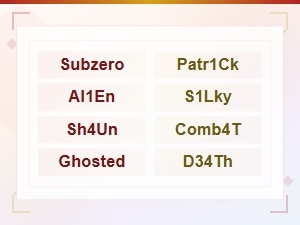 All Active Murder Mystery 2 Maker Codes List (2024)
 How to Enter Maker Codes in Your Game
 Expired Maker Codes Archive - Complete List of Past Codes
 Expired Maker Codes That No Longer Work – Updated 2024