You've got a code, you type it in, and... nothing happens. Frustrating, right? Maker codes in Roblox games like Murder Mystery 2 and others can unlock free knives, pets, skins, and other in-game rewards. But when those codes fail to work, it feels like you're missing out on freebies that everyone else is getting. This guide walks you through exactly why maker codes stop working and what you can do to fix each issue step by step.
What Are Maker Codes and Why Do They Sometimes Fail?
Maker codes are special promotional codes created by game developers or content creators for Roblox games. When you redeem them through the game's code redemption system, you receive free items like weapons, pets, or cosmetics. You can check out a full walkthrough on how to redeem maker codes in Roblox if you need a refresher on the process itself.
These codes can stop working for several reasons they expire, they've already been redeemed on your account, or there's a typo somewhere. Understanding the root cause saves you time and frustration.
Why Is My Maker Code Saying "Invalid"?
Seeing an "invalid code" error is the most common problem players run into. Here's what usually causes it:
- Typo or wrong capitalization. Many maker codes are case-sensitive. Typing "MURDER" instead of "murder" or "Murder" can trigger an error. Always copy and paste codes directly from a trusted source rather than typing them manually.
- Extra spaces. If you copy a code with a trailing space at the beginning or end, the system won't recognize it. Double-check for invisible spaces before hitting the redeem button.
- The code has expired. Most maker codes have a limited lifespan. Developers set expiration dates, and once that window closes, the code becomes permanently invalid. If you're unsure which codes are still active, browse our list of active Murder Mystery 2 maker codes to see what's currently working.
- The code never existed. Fake codes circulate on social media and YouTube all the time. If a code looks suspicious or was shared without an official source, it may simply be made up.
How Do I Fix the "Already Redeemed" Error?
If the game tells you the code has already been used, that means the code was a one-time-use code and it's been claimed on your account before. Here's the reality:
- Most maker codes can only be redeemed once per account. There's no workaround for this.
- Check your inventory the item might already be there. Sometimes players forget they redeemed a code weeks ago.
- If you have multiple Roblox accounts, try redeeming the code on a different account to confirm it still works.
Could the Problem Be With Roblox Servers?
Sometimes the issue isn't the code at all. Roblox experiences server outages and lag spikes, especially during major updates or high-traffic events. If the code redemption screen is loading slowly or returning errors without explanation, try these steps:
- Check the Optimus Font style page or any Roblox status page to verify if the platform is having downtime.
- Wait 15–30 minutes and try again. Server hiccups usually resolve quickly.
- Restart the game completely before attempting to redeem the code again.
Am I Putting the Code in the Right Place?
Each Roblox game has its own code redemption interface. In Murder Mystery 2, for example, you redeem codes through the inventory or a dedicated Twitter bird icon in the game's UI. In other games, it might be a settings menu or a separate "Codes" button.
If you're entering the code in the Roblox website's promo code section instead of inside the game itself, it won't work. Game-specific maker codes and Roblox avatar promo codes are two completely different systems. Make sure you're using the in-game code input, not the Roblox website redemption page.
What Are the Most Common Mistakes Players Make?
After helping hundreds of players troubleshoot these issues, these mistakes come up the most:
- Using outdated code lists. Codes get shared on blogs and videos that are months old. Always look for recently updated lists to avoid wasting time on expired codes.
- Not restarting the game after an update. Some codes only work after a game has been updated and you've loaded into the new version.
- Ignoring game-specific requirements. A few maker codes require you to join a specific group or follow a developer's social account before redemption works.
- Entering codes in the wrong game entirely. A code made for Murder Mystery 2 won't work in Blox Fruits or any other game. Each code is tied to one specific game.
When Should You Give Up on a Code?
Not every code is worth chasing. If you've verified the spelling, confirmed you're in the right game, checked that the code hasn't expired, and restarted your client and it still doesn't work it's likely the code is dead. Move on. New codes get released regularly, and holding onto a broken code just wastes your time.
Keep an eye on developer announcements on Twitter or Discord, since fresh codes often drop during milestones, holidays, or game updates.
Quick Checklist: Fix Your Maker Code in 60 Seconds
- Copy the code exactly no extra spaces, correct capitalization.
- Make sure you're redeeming inside the game, not on the Roblox website.
- Verify the code hasn't expired using a recently updated code list.
- Restart the Roblox game client and try again.
- Check if the item is already in your inventory.
- Try a different code to confirm the redemption system is working at all.
Next step: If you need fresh working codes, head over to our updated Murder Mystery 2 maker codes list and test a few. Most redemption problems come down to expired codes or simple typos both are easy fixes once you know where to look.
 New Maker Codes and Their Expiration Dates
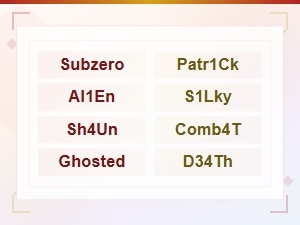 All Active Murder Mystery 2 Maker Codes List (2024)
 How to Enter Maker Codes in Your Game
 How to Redeem Maker Codes in Roblox – Complete Step-by-Step Guide
 Expired Maker Codes Archive - Complete List of Past Codes
 Expired Maker Codes That No Longer Work – Updated 2024